
In an era defined by explosive data growth and rapidly expanding drone-based sensing, the geospatial community faces a new frontier: unlocking the value of unstructured imagery. Chad Lopez, a solutions engineer with Esri’s Imagery and Remote Sensing team, is at the forefront of this effort.

In a recent interview, Lopez discussed how oriented imagery—raw photos enhanced with spatial metadata—can transform GIS workflows, empower public safety teams, and scale industrial inspections.
This article explores the power and promise of oriented imagery, using Esri’s Red Rocks digital twin demo and large-scale customer use cases, including PG&E and various state DOTs, to illustrate how organizations can extract intelligence from billions of previously underutilized images.
From Unstructured Chaos to Geospatial Insight
“You get images from a lot of different places,” Lopez said. “Cell phone images, drone images, 360 imagery from platforms like Mapillary—and traditionally, there’s not really a good way to view them on a map. But with oriented imagery, you’re able to click on the map and then view certain aspects of what those images are showing.”
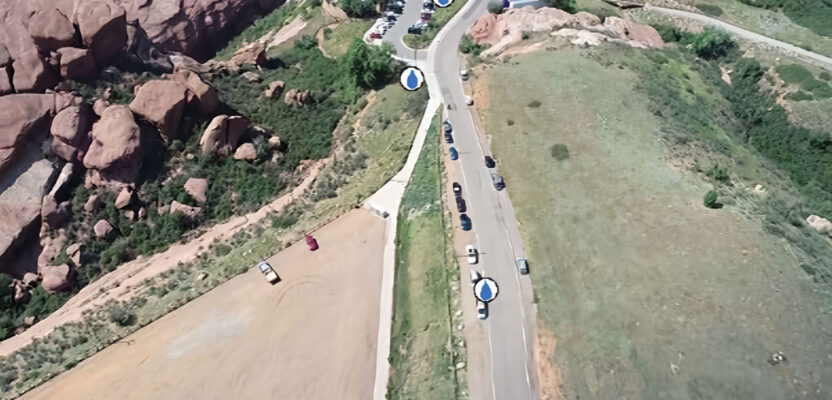
The Red Rocks project began as a demo to showcase Esri’s growing oriented image capabilities. Drawing from a rich dataset including 360-degree street-level imagery, drone video, and state-provided LIDAR data, the demo created a digital twin of the iconic amphitheater. The goal: enable users to interact with unstructured data in a geographic context, clicking on stage features or public spaces to access real-world images with embedded location and orientation data.
What emerges is not just a visually engaging environment—but a GIS-native system of record that adds clarity, context, and actionable insight to operational decisions.

Beyond Mesh and Orthos: A Layer of Detail Previously Lost
Meshes and orthophotos remain valuable base map layers. But Lopez draws a sharp distinction:
“Orthos are just a top-down perspective. You can get really high resolution, but you’re limited by that viewpoint. With oriented imagery, you’re using the raw photos that may be oblique, closer, or taken from angles that capture more specific detail.”
He notes that traditional mesh models often miss key features or fail to provide visual access under awnings, catwalks, or thin structures. Oriented imagery fills those gaps, offering side-angle or close-up views that reveal cracks, corrosion, or equipment wear impossible to detect from above.
“The mesh is only going to include things that you take consistent images of,” Lopez said. “But you can still get extra information from an individual cell phone photo. That level of flexibility is what makes this powerful.”
Inspection, Safety, and Scaling Remote Operations
One of the most compelling use cases is inspection. Whether the target is a bridge joint, a cell tower, or a solar array in the desert, oriented imagery provides safer, faster, and more scalable methods for analysis.
“You can run machine learning and deep learning on the images,” Lopez said. “You don’t even have to look through all of it. The model identifies damage, flags it, and you can click on the image and bring up the original photo—see how big the problem is.”
He points to PG&E’s implementation as a proof point. “They had millions of images collected over time and were able to put them all on the map to inspect equipment.”
Similarly, departments of transportation (DOTs) use the same techniques to evaluate road conditions, signage, and capital assets. Oriented imagery doesn’t just show what’s there—it enables time-series comparisons, precise measurements, and inventory cataloging.

From Metadata Wizardry to Real-World Utility
Despite its utility, integrating unstructured images into GIS isn’t plug-and-play. “Sometimes you have to do a little bit of wizardry with the metadata,” Lopez admitted. “Different cameras encode EXIF data differently. I’ve written Python scripts to extract the needed fields and populate a table so it works in the oriented imagery layer.”
This challenge is real, but Lopez is optimistic. He notes that Esri’s tools—including ArcGIS Reality and Site Scan—are increasingly automating the process, allowing users to work with drone-captured imagery with minimal preprocessing.
“If you generate your own mesh from ArcGIS Reality, you’ll get a frame table that’s accurate and easy to bring in. The measurements you can do—height, triangulated distance, slope—they’re derived directly from the raw images.”
These capabilities aren’t theoretical. Lopez built the Red Rocks demo to allow planners to identify water station locations along a 5K race route. By clicking on the video and digitizing points, planners could mark features and visualize slope and elevation in context.
Measuring, Cataloging, and Filling the Gaps
Oriented imagery isn’t just a visualization tool—it’s a measurement system.
“You can perform measurements on the raw images and translate them into real-world values,” Lopez said. “The triangulated distance tool uses two images to improve accuracy, and you can calculate slope, which is useful for all kinds of planning.”
Another underappreciated capability is cataloging. Using oriented imagery, users can mark features directly in the photo—like hydrants, traffic signs, or damaged infrastructure—and add them to the GIS system.
“You’re basically doing quality control on your GIS,” Lopez said. “If it’s missing features, oriented imagery helps fill those gaps.”
A Visual Layer for the Age of Infrastructure
As drone-based mapping becomes ubiquitous and industrial inspection grows more automated, Lopez sees a clear future for oriented imagery.
“We’re doing inspections in the office instead of in the field. You can send a drone, collect thousands of photos, and analyze them remotely. You don’t need to put people in harm’s way. And you can share those images across the entire organization.”
From mapping thin structures like pipes and power lines to validating public safety features and responding to infrastructure failure, oriented imagery offers a granular, flexible, and scalable solution.
PG&E’s Million-Image Solution
Pacific Gas and Electric (PG&E) has collected millions of high-resolution inspection images across its electrical infrastructure. Using Esri’s oriented imagery tools, PG&E geo-referenced each image and integrated them into ArcGIS. The result: an interactive map-based interface that allows inspectors to click on any asset and retrieve its inspection history visually.
This shift from spreadsheets and photo folders to a location-based inspection portal has improved operational efficiency, enhanced maintenance scheduling, and reduced the need for on-site visits. Machine learning tools now pre-screen the imagery, flagging anomalies for human review.
In Lopez’s words: “They put everything on the map. And now they can inspect equipment quickly and efficiently without sending a crew to every pole.”
Final Thoughts: A Call to Action
Lopez believes adoption will accelerate as more users discover what the tool can do.
“I show it to people who’ve never heard of it, and they’re surprised it’s already in ArcGIS. It’s something they can start using today—especially utility companies and DOTs. But really, anyone collecting imagery and using GIS could benefit.”
With automation, safety, cost-efficiency, and data integration all pointing toward oriented imagery, Lopez offers a challenge to the geospatial and unmanned systems community:
What if every image you took—no matter the source—was automatically mapped, indexed, and made available as part of your digital twin? What would that unlock?
xyHt will be watching closely as organizations answer that question.